
In the Linux command line, the grep command is a powerful tool for searching text within files.
In this article, I will go over 12 practical grep command examples that every Linux user, sysadmin, and developer should be aware of.
If you're wondering what grep stands for, it stands for global regular expression print. You can use grep to search through files or use it in conjunction with pipes or other commands to filter the output of another command. You'll find the grep command very useful in your day-to-day work as a sysadmin or Linux user once you've mastered it.
The syntax of the grep command is very simple:
$ grep [OPTION...] PATTERNS [FILE...]
In this article, I will use a file called 'linuxquotes.txt' to demonstrate how to use the commands. If you want to follow along you can find the contents of the file here:
Now that you know what grep is, let's look at the 12 practical grep command examples.
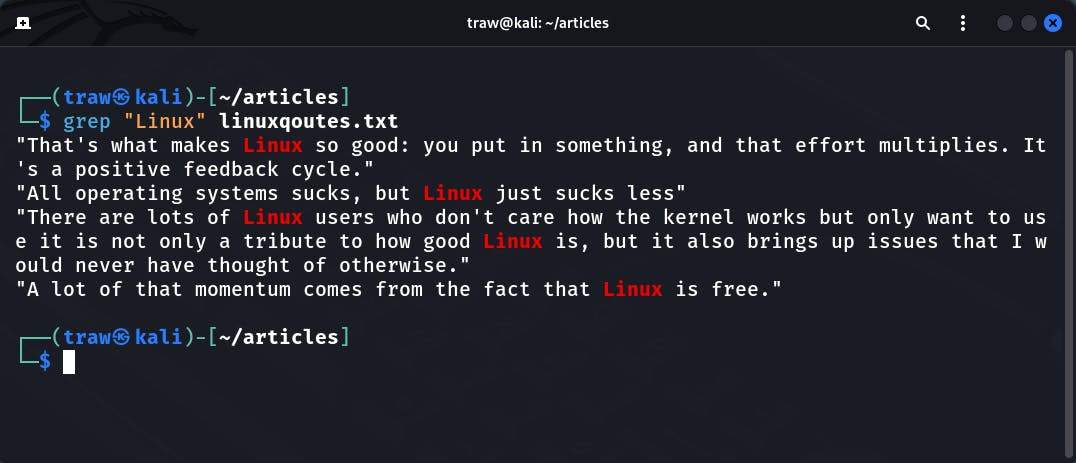
In this example, we tell grep to look for the word "Linux" and provide the file to look into as an argument. If the string you want to search contains spaces, you must surround it with quotes:
$ grep "Linux" linuxqoutes.txt
We can also instruct grep to search multiple files for a specific string. The following example demonstrates this clearly:
$ grep "Linux" linuxqoutes.txt learnlinux.txt
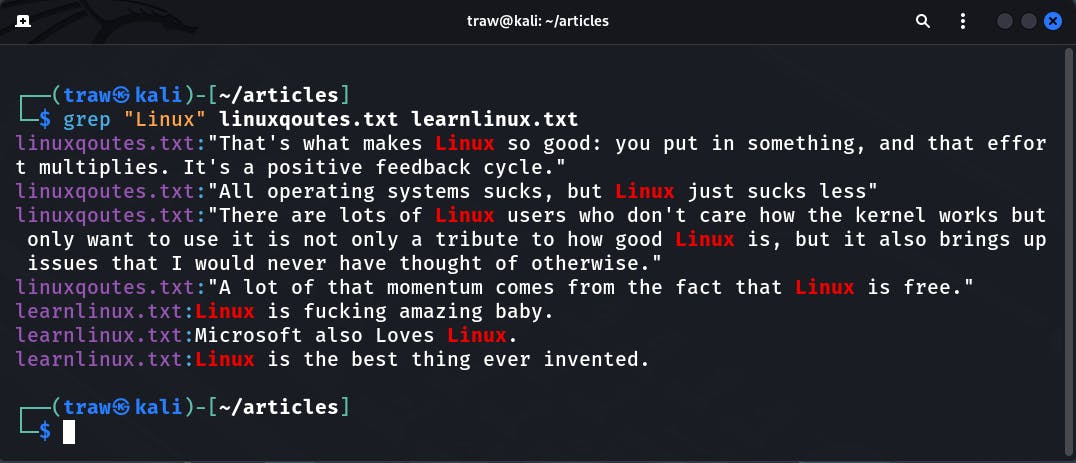
Notice, the grep command does a good job of specifying the file in which it finds a specific match. This is why the grep command is so useful for searching for strings in files.